Platform overview
Agentic Ui
Visual AI Editor turns a live page into a lightweight editing surface. Meaning a person can select an element, describe the change in everyday language, and let AI apply a focused CSS or text update directly to that element.
Experience
I built it around a simple question: what would it feel like if giving website feedback was as direct as pointing at the thing you meant?
Normally, a piece of feedback travels through a few translations. Someone takes a screenshot, adds an arrow, writes “make this blue,” sends it to a designer or developer, and then waits for the change to come back. That process works, but it loses context quickly. Which blue? This exact text, or the whole section? Is the request still relevant after the layout changes?
This is not about replacing designers or developers with AI. It is about making the first step of collaboration clearer: seeing the same thing, talking about the same thing, and leaving behind a record of what happened.
Edit in context
Everything happens in context. Instead of opening a separate panel and asking people to describe where something is, the editor lets them select the real button, heading, card, or paragraph on the page.
Hovering gives a light highlight before a selection is made. This is important because pages often have nested elements and similar looking content. The highlight is a quiet confirmation: “this is the thing you are about to edit.”
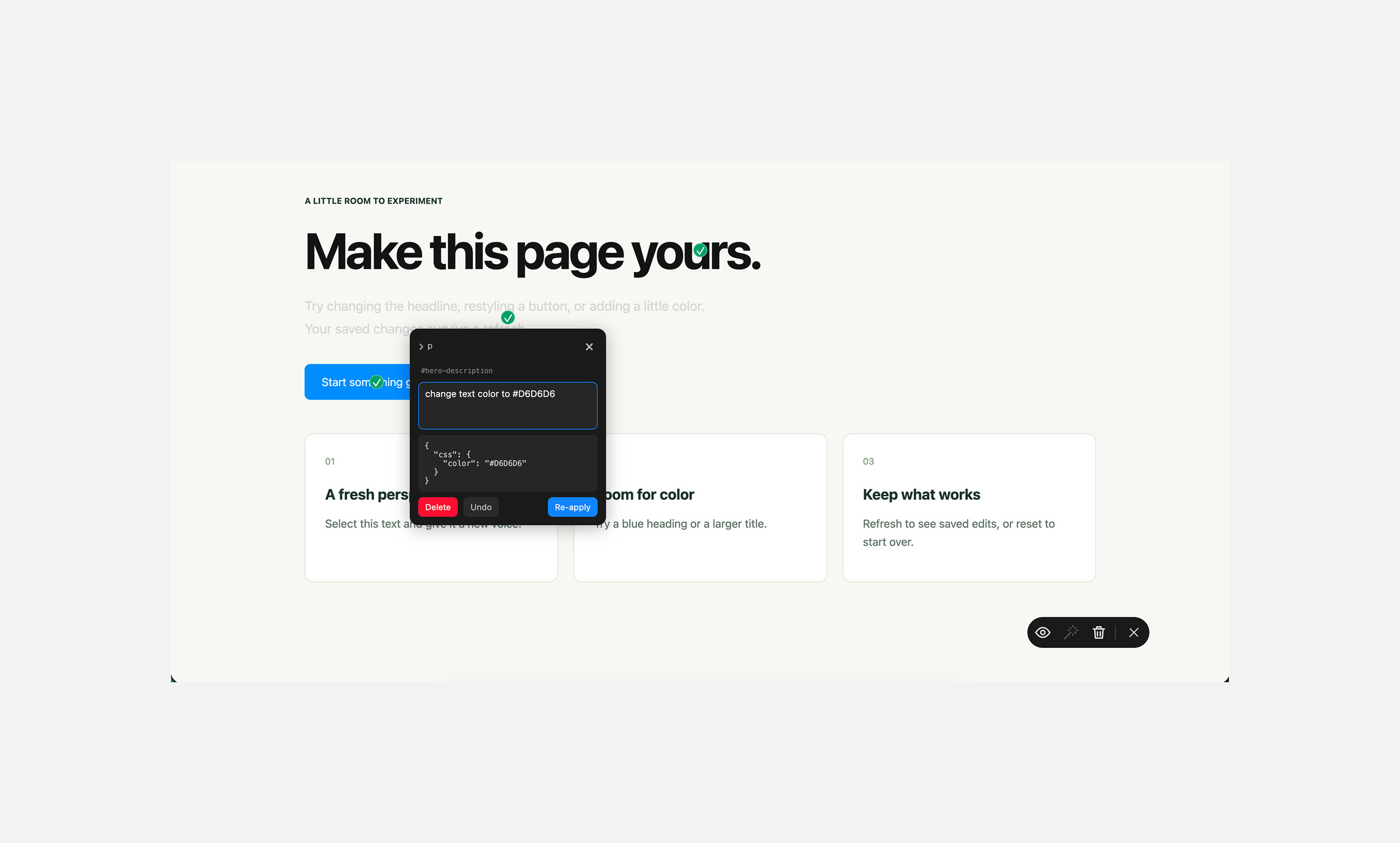
After someone clicks, the annotation popup appears close to that element. Keeping the popup nearby helps people connect their request to the right part of the page. It is more natural than opening a remote sidebar and asking them to remember what they selected.
Keep the control simple
The control rail is intentionally small. It has only the controls needed to work with the editor:
- Show or hide annotation markers
- Retry changes that need to be applied
- Clear saved changes
The goal is not to hide useful power. It is to show that power at the moment it becomes useful. The page remains the main character, the editor is there to support it.
Motion with a reason
The motion is not there to make the editor look “fancy.” It has a job:
- Opening motion confirms that a selection created the popup.
- Closing motion makes dismissal feel deliberate.
- The selected element remains visible behind the popup, preserving the link between action and context.
Small transitions like these add up. They make an overlay feel like part of the page rather than a separate system placed on top of it.
A marker is more than a pin
Every successful edit leaves behind a small marker. At first, it is easy to think of this as a simple annotation pin. In practice, it is the history of the work.
A marker says that someone made a deliberate change here. Opening it reveals the request, the applied result, and the actions available next: undo or delete.
This makes the editor useful for two different kinds of collaborators:
- A non-technical teammate can see that their feedback was acted on and remove it later if they change their mind.
- A technical teammate can see exactly which element was touched and inspect the CSS or text patch before moving the idea into the product code.
The difference between Undo and Delete is intentional:
Undoreverses the visible change but keeps the annotation around, so the idea is not lost.Deleteremoves both the marker and its saved edit. It will not return after refresh.Clearremoves every saved edit in one conscious action.
That distinction gives people room to explore without making their work feel fragile.
Remembering work across a refresh
Applied edits are saved through the editor’s server endpoint. When the page loads again, the editor restores both the change and its marker.
This was important to me because a successful change should not feel temporary just because the browser refreshed. Persistence turns the editor from a quick visual experiment into a useful conversation artifact: a small record of decisions that can be revisited later.
Working with AI without giving it too much power
I use gemma4:e2b to translate everyday requests into small CSS or text changes for the selected element. The model proposes a patch, and the editor validates it before applying it. This keeps AI useful without giving it open-ended control of the webpage.
The request body uses gemma4:e2b as the default model and requests a JSON response:
1body: JSON.stringify({2 model: provider.model ?? "gemma4:e2b",3 stream: false,4 format: "json",5 options: { temperature: 0.2 },6 messages,7}),The editor only accepts two forms of change:
- CSS properties, for appearance and layout
- plain text, for visible copy.
It does not execute JavaScript. It cannot change navigation, authentication, form submissions, product data, or the page structure. Unsafe values, URLs, scripts, and imports are rejected before a patch reaches the page.
For a request such as “make this text color dark blue,” a valid response is as small as:
1{2 "css": {3 "color": "#2563eb"4 }5}For a copy request, it might be:
1{2 "content": "A clearer, friendlier headline"3}The editor is also forgiving about harmless formatting differences from models. It can understand normal JSON, fenced JSON, direct CSS objects, and simple CSS declarations such as `color: red;`. That makes the experience more reliable without relaxing the safety boundary.
If the response cannot be used, the request remains in the popup. The person can adjust their wording and try again rather than losing what they wrote.